When we first started putting more visual cues into our progress-note templates, the obvious audience was the clinician. Particularly early-career clinicians.
Take a section like sensory processing patterns in an initial assessment. If you've been doing this for years, a heading like auditory probably tells you plenty. Your brain already knows the sorts of observations and information you're looking for.
For somebody newer, a page full of empty headings can feel very different. It can basically say:
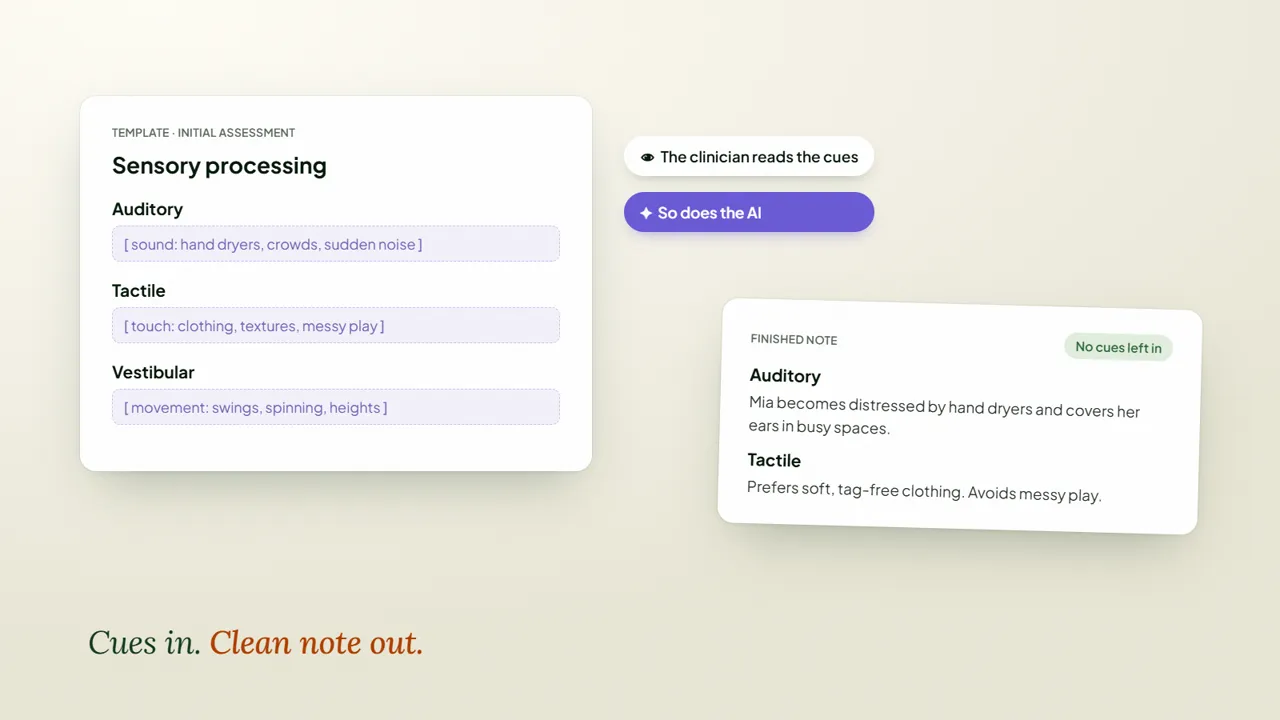
So we started leaving small cues in the template itself. Auditory and sound. Tactile and touch. Short prompts about the kinds of information that belong in that section. Nothing revolutionary, but enough to get somebody past the blank-page moment.
The second audience
Those same cues are read by the AI prompt. If a transcription mentions that a child becomes distressed by hand dryers, the cue gives the prompt more context about where that information belongs. If another piece relates to tactile input, same thing. The template isn't only structuring the finished note anymore. It's helping the system interpret the information coming in.
We've used the same idea for things like provider travel addresses. The template might contain several possible pieces of information, while the prompt works out which one is relevant to this particular session and only returns that one. That means we can sometimes maintain one good template instead of duplicating several almost-identical versions.
The final trick is to tell the prompt that the cues are there to guide it, not to appear in the finished note. So the clinician sees the guidance. The prompt sees the guidance. The final clinical record stays clean.
There is some prompt work behind this. I wouldn't paste one sentence into Splose and expect it to magically interpret every template correctly. But conceptually it's quite simple:
This one really benefits from seeing the template on screen, particularly how the cues sit alongside the actual headings.